REFERENCE IMAGES
Same pose.Your character.
Send Mara a photo and ask, “Hey, can you recreate this pose?” Your photo shows her how to lie on the couch. Her portrait guides her appearance. Tap + Image to see her reply.
Try 5 premium replies with Velvet and your first image free, once per account. No card required. Top up from $5 for more. Echo stays free. No subscription.
Use a reference in chatAI storytelling · Ages 18+
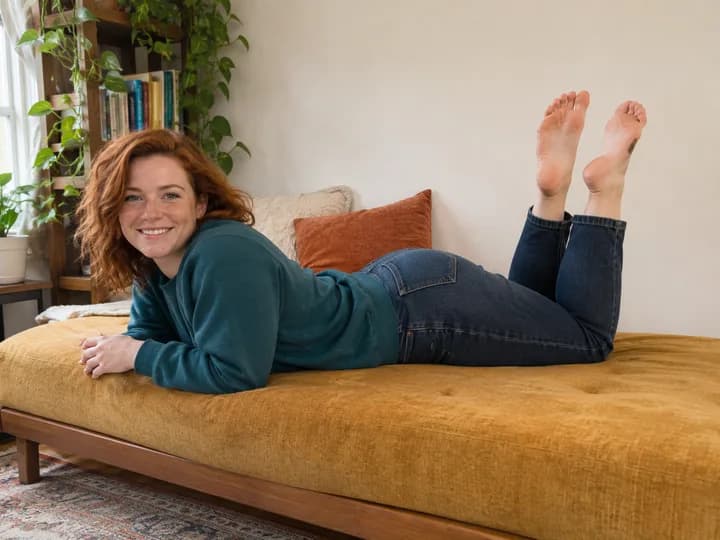
You send Mara a photo of a red-haired woman lying on her stomach, propped on her forearms with her knees bent and the soles of her feet facing the camera. You ask Mara to recreate the pose. A tap on + Image shows brown-haired Mara in the same pose on her own couch. Both pictures are AI-generated.

Fictional character · pre-generated AI media
HOW IT WORKS
How to recreate a pose from a photo
- 1
Send the pose
Choose a photo where you can see the whole pose. Send it in the chat with a message about what you want your character to do.
- 2
Choose what each photo guides
Open image settings and choose a model that supports both references. Select your character’s portrait for the person and the uploaded photo for the pose.
- 3
See your character try it
Tap + Image. In this example, Mara props herself up on her elbows and bends her knees, just like the woman in the photo. She’s still on her own green couch.
What to put in each reference
A portrait for the person
A clear view of the face and hair helps the model carry your character’s features into a new picture.
A photo for the pose
Pick a shot that shows the important details. In Mara’s example you can see her friend’s elbows, bent knees and both feet.
A message for the rest
Want the pose in a different setting or outfit? Describe those details in the chat or add them in image settings.
FAQ
Using reference photos in chat
Does uploading a photo automatically make it the pose reference?
Select the photo under Pose in image settings to use it for generation. Uploading it to the conversation also lets the chat discuss it when image recognition is enabled.How image recognition works
Will the pose and face match exactly?
The photos guide the result. The angle, hands or facial features can vary. A clearly visible pose and a separate, well-lit portrait give the model more to work with.
Can I generate a picture from the chat alone?
Yes. Leave the pose and setting to the conversation and request a scene image with + Image.See a chat turn into a scene image
More ways to shape your chat
Create characters
Choose a personality, appearance and backstory for the characters you chat with.
Explore this feature02AI roleplay chat
Write together, edit replies and explore a different turn in the story without losing the original chat.
Explore this feature03Upload & image recognition
Upload a picture and let the chat respond to its clothing, objects and surroundings.
Explore this feature04Scene images
Turn the current scene into an image, with references to help guide your character's appearance.
Explore this feature05Image animation
Choose an image from the chat, describe a movement and turn it into a short video.
Explore this featureStart your own conversation.
Create a character and see where your story goes.
Create accountTry 5 premium replies with Velvet and your first image free, once per account. No card required. Top up from $5 for more. Echo stays free. No subscription.